<?xml version="1.0" encoding="utf-8"?><feed xmlns="http://www.w3.org/2005/Atom" xml:lang="en"><generator uri="https://jekyllrb.com/" version="3.10.0">Jekyll</generator><link href="https://lsambolino.github.io/feed.xml" rel="self" type="application/atom+xml" /><link href="https://lsambolino.github.io/" rel="alternate" type="text/html" hreflang="en" /><updated>2026-04-25T20:28:04+00:00</updated><id>https://lsambolino.github.io/feed.xml</id><title type="html">Luigi Sambolino</title><subtitle>Cloud &amp; DevOps Engineer | Building resilient systems with Kubernetes, OpenShift, and cloud-native technologies. Sharing experiences and insights on cloud infrastructure and modern DevOps practices.</subtitle><author><name>Luigi Sambolino</name><email>lsambolino@gmail.com</email></author><entry xml:lang="en"><title type="html">AZ-104: Azure Administrator Certification Guide</title><link href="https://lsambolino.github.io/azure/certification/2026/01/19/az104-azure-administrator-certification-guide.html" rel="alternate" type="text/html" title="AZ-104: Azure Administrator Certification Guide" /><published>2026-01-19T00:00:00+00:00</published><updated>2026-01-19T00:00:00+00:00</updated><id>https://lsambolino.github.io/azure/certification/2026/01/19/az104-azure-administrator-certification-guide</id><content type="html" xml:base="https://lsambolino.github.io/azure/certification/2026/01/19/az104-azure-administrator-certification-guide.html"><![CDATA[<p>As I study for the AZ-104 (Azure Administrator) certification, I’m documenting key concepts and knowledge to share with others on the same learning journey.</p>

<h2 id="overview">Overview</h2>

<p>The AZ-104 certification validates the skills needed to manage Azure subscriptions, secure identities, administer the infrastructure, and manage data and applications.</p>

<h2 id="topics-covered">Topics Covered</h2>

<h3 id="1-manage-azure-identities-and-governance">1. Manage Azure Identities and Governance</h3>
<ul>
  <li>Manage Azure AD users and groups</li>
  <li>Manage access with RBAC</li>
  <li>Manage subscriptions and governance</li>
</ul>

<h4 id="azure-subscription-basics">Azure Subscription Basics</h4>
<ul>
  <li>Definition: A subscription is a logical container for Azure resources and the billing boundary for their consumption.</li>
</ul>

<h4 id="microsoft-entra-id-formerly-azure-active-directory">Microsoft Entra ID (formerly Azure Active Directory)</h4>
<p>Note: Azure Active Directory is now called Microsoft Entra ID. 
Microsoft Entra is Microsoft’s cloud-based identity and access management service.</p>

<p><strong>Tenant</strong>: A dedicated instance that an organization receives when they sign up for a Microsoft cloud service.
It represents the organization and contains all of its users, groups, applications and other identity-related resources.
Each tenant has a unique domain name and is completely isolated from other tenants.</p>

<p><strong>Licenses</strong>: Subscription-based entitlements that grant users access to specific Microsoft cloud services and features.
Examples:
Microsoft 365 E3/E5
Office 365
Each license provides access to a bundle of services and must be assigned to users before they can use those services.</p>

<p><strong>Entra ID Attributes</strong>: Properties or characteristics associated with user objects in Microsoft Entra ID. These include information such as:</p>
<ul>
  <li>Department</li>
  <li>Job title</li>
  <li>Office location</li>
  <li>Employee type (contractor, full-time, etc.)</li>
  <li>Custom attributes</li>
</ul>

<p>Attributes: metadata about users that can be used for automation, filtering, and policy application.</p>

<p><strong>Dynamic security groups</strong> are groups in Microsoft Entra ID where membership is automatically determined and updated based on user or device attributes, rather than being manually managed. The group membership is controlled by rules (queries) that evaluate attributes, and users or devices are automatically added or removed as their attributes change.</p>

<h3 id="2-implement-and-manage-storage">2. Implement and Manage Storage</h3>
<ul>
  <li>Create and configure storage accounts</li>
  <li>Manage data in Azure Storage</li>
  <li>Configure Azure Files and Azure Blob Storage</li>
</ul>

<h3 id="3-deploy-and-manage-compute-resources">3. Deploy and Manage Compute Resources</h3>
<ul>
  <li>Create and configure virtual machines</li>
  <li>Automate deployment using Azure Resource Manager templates</li>
  <li>Create and configure containers</li>
  <li>Create and configure App Service</li>
</ul>

<h3 id="4-configure-and-manage-virtual-networking">4. Configure and Manage Virtual Networking</h3>
<ul>
  <li>Implement virtual networks</li>
  <li><strong>Configure network security groups and application security groups</strong>
    <ul>
      <li><strong>NSG Assignment Scope</strong>: Network Security Groups can be assigned to network interfaces, giving you fine-grained control over where security rules apply. You have two main approaches:
        <ul>
          <li><strong>Subnet-Level NSG</strong>: Assign an NSG to an entire subnet, and the access control list (ACL) rules automatically apply to all virtual machine instances within that subnet. This is efficient for managing consistent security policies across multiple VMs.</li>
          <li><strong>Network Interface-Level NSG</strong>: Assign an NSG to a specific virtual machine’s network interface for granular, VM-specific security control. This approach allows different security policies for individual machines, even within the same subnet.</li>
        </ul>
      </li>
      <li><strong>NSG Port Configuration</strong>: To allow Remote Desktop Management and Secured HTTPS, configure inbound security rules to allow port 3389 (RDP) and allow port 443 (HTTPS)</li>
      <li><strong>Application Security Groups (ASG)</strong>: When you have multiple subnets (e.g., 4 subnets with 10 VMs each) and need to allow inbound traffic over TCP 8080 to specific VMs (e.g., 2 VMs per subnet), use Application Security Groups. ASGs allow you to group together the network interfaces from multiple virtual machines, then use the group as the source or destination in an NSG rule. <strong>Important</strong>: All network interfaces must be in the same virtual network. Associate the NSG to each subnet and use the ASG in the rule to target only the specific VMs that need access, rather than managing individual IP addresses.</li>
      <li>
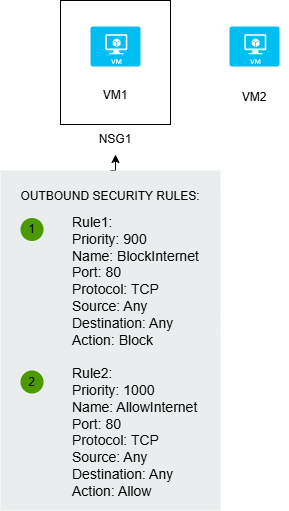
        <p><strong>NSG Rule Priority</strong>: Rule priority is critical in NSGs - lower numbers are evaluated first. Example scenario with NSG1 containing VM1 and VM2 with outbound security rules:</p>

        <p><img src="/assets/images/nsg-priority-example.png" alt="NSG Rule Priority Example" /></p>

        <ul>
          <li>Rule1 (Priority: 900) - BlockInternet - Port: 80, Protocol: TCP, Action: Block</li>
          <li>Rule2 (Priority: 1000) - AllowInternet - Port: 80, Protocol: TCP, Action: Allow</li>
        </ul>

        <p>In this case, Rule1 (priority 900) will be evaluated first and <strong>block</strong> internet access on port 80. To ensure internet access to VM1 on port 80 is allowed, you must change the priority of Rule2 to a number lower than 900 (e.g., 800 or 850) so it gets evaluated before the blocking rule. Remember: <strong>Lower priority number = higher precedence</strong>.</p>
      </li>
    </ul>
  </li>
  <li>Configure Azure DNS</li>
  <li>Configure Azure ExpressRoute</li>
  <li><strong>User-Defined Routes (UDR)</strong>: If you need to ensure all network traffic passes through a virtual machine named VM1 (a network inspection appliance), you need to configure a user-defined route. Azure automatically creates a route table for each subnet on an Azure virtual network, but custom routes allow you to override the default routing behavior and direct traffic through specific network appliances for inspection or filtering.</li>
</ul>

<h3 id="5-monitor-and-maintain-azure-resources">5. Monitor and Maintain Azure Resources</h3>
<ul>
  <li>Monitor resources using Azure Monitor</li>
  <li>Implement backup and recovery</li>
  <li>Manage Azure updates</li>
</ul>

<h2 id="key-resources">Key Resources</h2>
<ul>
  <li><a href="https://learn.microsoft.com/en-us/training/paths/az-104-administrator-prerequisites/">Microsoft Learn - AZ-104</a></li>
  <li><a href="https://learn.microsoft.com/en-us/certifications/exams/az-104/">Exam Skills Outline</a></li>
</ul>

<h2 id="study-progress">Study Progress</h2>
<ul class="task-list">
  <li class="task-list-item"><input type="checkbox" class="task-list-item-checkbox" disabled="disabled" />Module 1: Identity</li>
  <li class="task-list-item"><input type="checkbox" class="task-list-item-checkbox" disabled="disabled" />Module 2: Governance and Compliance</li>
  <li class="task-list-item"><input type="checkbox" class="task-list-item-checkbox" disabled="disabled" />Module 3: Azure Administration</li>
  <li class="task-list-item"><input type="checkbox" class="task-list-item-checkbox" disabled="disabled" />Practice Exams</li>
</ul>

<hr />

<p><em>This post will be updated as I progress through the certification study materials.</em></p>]]></content><author><name>Luigi Sambolino</name></author><category term="azure" /><category term="certification" /><category term="az-104" /><category term="azure-administrator" /><category term="cloud" /><summary type="html"><![CDATA[As I study for the AZ-104 (Azure Administrator) certification, I’m documenting key concepts and knowledge to share with others on the same learning journey.]]></summary></entry><entry xml:lang="it"><title type="html">Scadenza TLS in Kubernetes: bomba a orologeria che causa interruzioni critiche</title><link href="https://lsambolino.github.io/kubernetes/2024/09/10/scadenza-tls-causa-interruzione-kubernetes-it.html" rel="alternate" type="text/html" title="Scadenza TLS in Kubernetes: bomba a orologeria che causa interruzioni critiche" /><published>2024-09-10T17:30:12+00:00</published><updated>2024-09-10T17:30:12+00:00</updated><id>https://lsambolino.github.io/kubernetes/2024/09/10/scadenza-tls-causa-interruzione-kubernetes-it</id><content type="html" xml:base="https://lsambolino.github.io/kubernetes/2024/09/10/scadenza-tls-causa-interruzione-kubernetes-it.html"><![CDATA[<p>Immagina la scena: una giornata di routine nelle nostre operazioni tecniche si trasforma improvvisamente in una corsa contro il tempo ad alta tensione. Il nostro team di sviluppo è nel pieno di deployment critici quando si scontra con un muro—un’interruzione imprevista del servizio che minaccia di far deragliare il loro flusso di lavoro. Quella che segue è una storia di troubleshooting, lavoro di squadra e alcune rivelazioni sorprendenti.</p>

<p>La chiamata inaspettata
Tutto è iniziato con una chiamata urgente dal nostro team di sviluppo. Stavano affrontando un’interruzione grave nei loro deployment, ed era chiaro che qualcosa era andato storto nei nostri cluster Kubernetes di pre-produzione (staging). Man mano che la confusione iniziale si placava, sapevamo di dover scavare a fondo per arrivare al nocciolo del problema.</p>

<p>Identificazione dei colpevoli</p>

<ol>
  <li><strong>I certificati scaduti.</strong> Il primo indizio è arrivato da una fonte inaspettata: certificati TLS scaduti. Nel mondo di Kubernetes, questi certificati sono gli eroi non celebrati della comunicazione sicura. Quando scadono, l’intera rete di fiducia del sistema vacilla. Abbiamo capito rapidamente che non si trattava di un piccolo intoppo ma di un ostacolo significativo. Per prima cosa, abbiamo eseguito <strong><code class="language-plaintext highlighter-rouge">kubeadm certs check-expiration</code></strong>:</li>
</ol>

<figure class="highlight"><pre><code class="language-bash" data-lang="bash">CERTIFICATE                EXPIRES                  RESIDUAL TIME   CERTIFICATE AUTHORITY   EXTERNALLY MANAGED
admin.conf                 Dec 30, 2020 23:36 UTC   364d                                    no
apiserver                  Dec 30, 2020 23:36 UTC   364d            ca                      no
apiserver-etcd-client      Dec 30, 2020 23:36 UTC   364d            etcd-ca                 no
apiserver-kubelet-client   Dec 30, 2020 23:36 UTC   364d            ca                      no
controller-manager.conf    Dec 30, 2020 23:36 UTC   364d                                    no
etcd-healthcheck-client    Dec 30, 2020 23:36 UTC   364d            etcd-ca                 no
etcd-peer                  Dec 30, 2020 23:36 UTC   364d            etcd-ca                 no
etcd-server                Dec 30, 2020 23:36 UTC   364d            etcd-ca                 no
front-proxy-client         Dec 30, 2020 23:36 UTC   364d            front-proxy-ca          no
scheduler.conf             Dec 30, 2020 23:36 UTC   364d                                    no

CERTIFICATE AUTHORITY   EXPIRES                  RESIDUAL TIME   EXTERNALLY MANAGED
ca                      Dec 28, 2029 23:36 UTC   9y              no
etcd-ca                 Dec 28, 2029 23:36 UTC   9y              no
front-proxy-ca          Dec 28, 2029 23:36 UTC   9y              no</code></pre></figure>

<ol>
  <li>
    <p><strong>La rete di dipendenze.</strong> Man mano che svelavamo i vari livelli del problema, abbiamo scoperto una complessa rete di dipendenze tra i servizi. I servizi Kubernetes si affidano l’uno all’altro in modi intricati, e comprendere queste connessioni era fondamentale.</p>
  </li>
  <li>
    <p><strong>La configurazione disordinata.</strong> Ci siamo anche imbattuti nella configurazione YAML dell’apiserver, che era un disastro di righe obsolete e non necessarie. Era come trovare disordine in uno spazio di lavoro un tempo organizzato—una distrazione da eliminare per vedere chiaramente il problema.</p>
  </li>
  <li>
    <p><strong>Rinnovo dei certificati.</strong> Il certificato dell’apiserver era scaduto dopo il tempo predefinito (1 anno). Con le cause alla radice identificate, ci siamo messi al lavoro sul rinnovo dei certificati scaduti, assicurandoci che i nuovi certificati fossero correttamente emessi e integrati.</p>
  </li>
  <li>
    <p><strong>Pulizia della configurazione.</strong> Successivamente, abbiamo affrontato il file YAML dell’apiserver disordinato. Abbiamo eliminato le configurazioni obsolete, semplificando e razionalizzando il setup.</p>
  </li>
  <li>
    <p><strong>Test e verifica.</strong> Con le modifiche in atto, abbiamo eseguito una serie di test per assicurarci che tutto funzionasse senza problemi. Ogni test superato confermava che avevamo ripristinato le normali operazioni e risolto le interruzioni.</p>
  </li>
</ol>

<p>Riflessioni sul percorso
Questo incidente è stato un potente promemoria dell’importanza della gestione proattiva dei certificati e della comprensione delle intricate dipendenze all’interno di un cluster Kubernetes. È stata un’esperienza impegnativa, ma che alla fine ha rafforzato il nostro approccio e i nostri processi.</p>

<p>Andando avanti, continueremo a condividere il nostro percorso e le nostre intuizioni, perfezionando le nostre pratiche per prevenire interruzioni future. Restate sintonizzati per ulteriori aggiornamenti e lezioni apprese dalle nostre continue avventure nel mondo di Kubernetes.</p>

<p>Conclusione
Gestire cluster Kubernetes va oltre il semplice deployment e scaling—richiede un’attenzione meticolosa alla sicurezza e all’igiene dell’infrastruttura. L’interruzione inaspettata causata dai certificati TLS scaduti ci ha insegnato lezioni preziose sull’importanza della gestione proattiva dei certificati e degli audit regolari del cluster.</p>

<p>Rafforzando i nostri processi di monitoraggio e semplificando le configurazioni, non solo abbiamo risolto questo problema critico ma abbiamo anche fortificato il nostro ambiente per le sfide future. Questa esperienza è un promemoria che negli ecosistemi cloud-native, anche componenti apparentemente minori come i certificati possono essere bombe a orologeria pronte a esplodere.</p>

<p>Rimanere vigili e preparati sarà fondamentale mentre continuiamo a navigare nel complesso ma gratificante panorama di Kubernetes.</p>]]></content><author><name>Luigi Sambolino</name></author><category term="kubernetes" /><summary type="html"><![CDATA[Immagina la scena: una giornata di routine nelle nostre operazioni tecniche si trasforma improvvisamente in una corsa contro il tempo ad alta tensione. Il nostro team di sviluppo è nel pieno di deployment critici quando si scontra con un muro—un’interruzione imprevista del servizio che minaccia di far deragliare il loro flusso di lavoro. Quella che segue è una storia di troubleshooting, lavoro di squadra e alcune rivelazioni sorprendenti.]]></summary></entry><entry xml:lang="en"><title type="html">Kubernetes TLS Expiration: Critical Impact on Service Availability</title><link href="https://lsambolino.github.io/kubernetes/2024/09/10/tls-expiration-causes-major-kubernetes-disruption.html" rel="alternate" type="text/html" title="Kubernetes TLS Expiration: Critical Impact on Service Availability" /><published>2024-09-10T17:30:12+00:00</published><updated>2024-09-10T17:30:12+00:00</updated><id>https://lsambolino.github.io/kubernetes/2024/09/10/tls-expiration-causes-major-kubernetes-disruption</id><content type="html" xml:base="https://lsambolino.github.io/kubernetes/2024/09/10/tls-expiration-causes-major-kubernetes-disruption.html"><![CDATA[<p>During routine operations, our pre-production Kubernetes cluster experienced a significant service disruption. This incident highlighted a critical infrastructure vulnerability: expired TLS certificates. This post documents the incident, root cause analysis, and remediation steps taken to prevent future occurrences.</p>

<h2 id="incident-overview">Incident Overview</h2>

<p>Our development team reported deployment failures affecting the pre-production environment. Initial investigation revealed the root cause was related to security certificates within the Kubernetes cluster infrastructure.</p>

<h2 id="root-cause-analysis">Root Cause Analysis</h2>

<p>The investigation identified several contributing factors:</p>

<ol>
  <li><strong>Expired TLS Certificates.</strong> The primary cause was the expiration of TLS certificates used for cluster component communication. In Kubernetes, these certificates authenticate communication between critical system components. When certificates expire, authentication failures cascade throughout the cluster, preventing normal operations. Running <code class="language-plaintext highlighter-rouge">kubeadm certs check-expiration</code> revealed:</li>
</ol>

<figure class="highlight"><pre><code class="language-bash" data-lang="bash">CERTIFICATE                EXPIRES                  RESIDUAL TIME   CERTIFICATE AUTHORITY   EXTERNALLY MANAGED
admin.conf                 Dec 30, 2020 23:36 UTC   364d                                    no
apiserver                  Dec 30, 2020 23:36 UTC   364d            ca                      no
apiserver-etcd-client      Dec 30, 2020 23:36 UTC   364d            etcd-ca                 no
apiserver-kubelet-client   Dec 30, 2020 23:36 UTC   364d            ca                      no
controller-manager.conf    Dec 30, 2020 23:36 UTC   364d                                    no
etcd-healthcheck-client    Dec 30, 2020 23:36 UTC   364d            etcd-ca                 no
etcd-peer                  Dec 30, 2020 23:36 UTC   364d            etcd-ca                 no
etcd-server                Dec 30, 2020 23:36 UTC   364d            etcd-ca                 no
front-proxy-client         Dec 30, 2020 23:36 UTC   364d            front-proxy-ca          no
scheduler.conf             Dec 30, 2020 23:36 UTC   364d                                    no

CERTIFICATE AUTHORITY   EXPIRES                  RESIDUAL TIME   EXTERNALLY MANAGED
ca                      Dec 28, 2029 23:36 UTC   9y              no
etcd-ca                 Dec 28, 2029 23:36 UTC   9y              no
front-proxy-ca          Dec 28, 2029 23:36 UTC   9y              no</code></pre></figure>

<ol>
  <li>
    <p><strong>Inter-Service Dependencies.</strong> Kubernetes cluster components have strict interdependencies for secure communication. Certificate expiration affects the entire authentication chain, preventing services from communicating with each other, which in turn cascades failures across multiple systems.</p>
  </li>
  <li>
    <p><strong>Configuration Complexity.</strong> The apiserver YAML configuration contained obsolete parameters and unnecessary configurations that complicated troubleshooting efforts and delayed root cause identification.</p>
  </li>
  <li>
    <p><strong>Certificate Renewal.</strong> All expired certificates were renewed using the standard Kubernetes certificate renewal procedures. The apiserver certificate, which had expired after the default one-year validity period, was regenerated and redeployed.</p>
  </li>
  <li>
    <p><strong>Configuration Optimization.</strong> The apiserver YAML configuration was reviewed and cleaned, removing deprecated parameters and unnecessary entries to improve maintainability and reduce future troubleshooting complexity.</p>
  </li>
  <li>
    <p><strong>Validation and Testing.</strong> Comprehensive testing was performed to verify that all cluster components successfully established secure communication and that normal operations were restored.</p>
  </li>
</ol>

<h2 id="key-takeaways">Key Takeaways</h2>

<p>This incident underscores several important operational principles:</p>

<ul>
  <li><strong>Proactive Certificate Management:</strong> Automated certificate rotation and monitoring are essential for maintaining cluster stability</li>
  <li><strong>Dependency Awareness:</strong> Understanding inter-component dependencies is critical for effective incident response</li>
  <li><strong>Configuration Management:</strong> Clean, well-organized configurations reduce troubleshooting time and improve operational visibility</li>
  <li><strong>Regular Audits:</strong> Periodic reviews of cluster certificates and configurations can prevent similar incidents</li>
</ul>

<h2 id="conclusion">Conclusion</h2>

<p>Certificate management is a foundational aspect of Kubernetes cluster operations. While TLS certificates are often overlooked in favor of more visible infrastructure components, their expiration can have cascading effects on system availability. By implementing automated certificate lifecycle management and maintaining proper monitoring practices, organizations can significantly reduce the risk of certificate-related outages. This incident has led to the implementation of enhanced monitoring and automated certificate rotation to prevent future disruptions.</p>]]></content><author><name>Luigi Sambolino</name></author><category term="kubernetes" /><summary type="html"><![CDATA[During routine operations, our pre-production Kubernetes cluster experienced a significant service disruption. This incident highlighted a critical infrastructure vulnerability: expired TLS certificates. This post documents the incident, root cause analysis, and remediation steps taken to prevent future occurrences.]]></summary></entry></feed>