AZ-104: Azure Administrator Certification Guide
As I study for the AZ-104 (Azure Administrator) certification, I’m documenting key concepts and knowledge to share with others on the same learning journey.
Overview
The AZ-104 certification validates the skills needed to manage Azure subscriptions, secure identities, administer the infrastructure, and manage data and applications.
Topics Covered
1. Manage Azure Identities and Governance
- Manage Azure AD users and groups
- Manage access with RBAC
- Manage subscriptions and governance
Azure Subscription Basics
- Definition: A subscription is a logical container for Azure resources and the billing boundary for their consumption.
Microsoft Entra ID (formerly Azure Active Directory)
Note: Azure Active Directory is now called Microsoft Entra ID. Microsoft Entra is Microsoft’s cloud-based identity and access management service.
Tenant: A dedicated instance that an organization receives when they sign up for a Microsoft cloud service. It represents the organization and contains all of its users, groups, applications and other identity-related resources. Each tenant has a unique domain name and is completely isolated from other tenants.
Licenses: Subscription-based entitlements that grant users access to specific Microsoft cloud services and features. Examples: Microsoft 365 E3/E5 Office 365 Each license provides access to a bundle of services and must be assigned to users before they can use those services.
Entra ID Attributes: Properties or characteristics associated with user objects in Microsoft Entra ID. These include information such as:
- Department
- Job title
- Office location
- Employee type (contractor, full-time, etc.)
- Custom attributes
Attributes: metadata about users that can be used for automation, filtering, and policy application.
Dynamic security groups are groups in Microsoft Entra ID where membership is automatically determined and updated based on user or device attributes, rather than being manually managed. The group membership is controlled by rules (queries) that evaluate attributes, and users or devices are automatically added or removed as their attributes change.
2. Implement and Manage Storage
- Create and configure storage accounts
- Manage data in Azure Storage
- Configure Azure Files and Azure Blob Storage
3. Deploy and Manage Compute Resources
- Create and configure virtual machines
- Automate deployment using Azure Resource Manager templates
- Create and configure containers
- Create and configure App Service
4. Configure and Manage Virtual Networking
- Implement virtual networks
- Configure network security groups and application security groups
- NSG Assignment Scope: Network Security Groups can be assigned to network interfaces, giving you fine-grained control over where security rules apply. You have two main approaches:
- Subnet-Level NSG: Assign an NSG to an entire subnet, and the access control list (ACL) rules automatically apply to all virtual machine instances within that subnet. This is efficient for managing consistent security policies across multiple VMs.
- Network Interface-Level NSG: Assign an NSG to a specific virtual machine’s network interface for granular, VM-specific security control. This approach allows different security policies for individual machines, even within the same subnet.
- NSG Port Configuration: To allow Remote Desktop Management and Secured HTTPS, configure inbound security rules to allow port 3389 (RDP) and allow port 443 (HTTPS)
- Application Security Groups (ASG): When you have multiple subnets (e.g., 4 subnets with 10 VMs each) and need to allow inbound traffic over TCP 8080 to specific VMs (e.g., 2 VMs per subnet), use Application Security Groups. ASGs allow you to group together the network interfaces from multiple virtual machines, then use the group as the source or destination in an NSG rule. Important: All network interfaces must be in the same virtual network. Associate the NSG to each subnet and use the ASG in the rule to target only the specific VMs that need access, rather than managing individual IP addresses.
-
NSG Rule Priority: Rule priority is critical in NSGs - lower numbers are evaluated first. Example scenario with NSG1 containing VM1 and VM2 with outbound security rules:
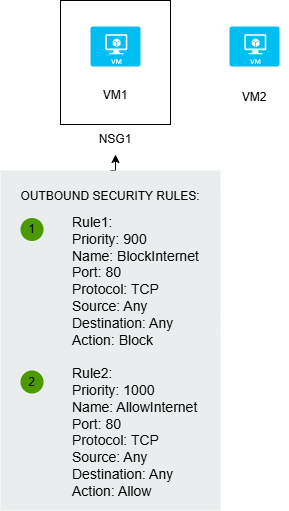
- Rule1 (Priority: 900) - BlockInternet - Port: 80, Protocol: TCP, Action: Block
- Rule2 (Priority: 1000) - AllowInternet - Port: 80, Protocol: TCP, Action: Allow
In this case, Rule1 (priority 900) will be evaluated first and block internet access on port 80. To ensure internet access to VM1 on port 80 is allowed, you must change the priority of Rule2 to a number lower than 900 (e.g., 800 or 850) so it gets evaluated before the blocking rule. Remember: Lower priority number = higher precedence.
- NSG Assignment Scope: Network Security Groups can be assigned to network interfaces, giving you fine-grained control over where security rules apply. You have two main approaches:
- Configure Azure DNS
- Configure Azure ExpressRoute
- User-Defined Routes (UDR): If you need to ensure all network traffic passes through a virtual machine named VM1 (a network inspection appliance), you need to configure a user-defined route. Azure automatically creates a route table for each subnet on an Azure virtual network, but custom routes allow you to override the default routing behavior and direct traffic through specific network appliances for inspection or filtering.
5. Monitor and Maintain Azure Resources
- Monitor resources using Azure Monitor
- Implement backup and recovery
- Manage Azure updates
Key Resources
Study Progress
- Module 1: Identity
- Module 2: Governance and Compliance
- Module 3: Azure Administration
- Practice Exams
This post will be updated as I progress through the certification study materials.
💬 Comments & Discussion
Found this helpful? Have questions or suggestions? Leave a comment below!